

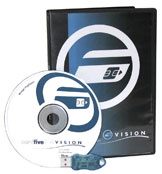
CardFive Vision Lite XL ID card software provides easy-to-use tools that can help you get your card personalization application up and running. The second edition in the CardFive Vision software line, CardFive Vision Lite XL offers an array of powerful design and printing tools, including import capability to your CSV database files, network print server accessibility, and magnetic stripe encoding. CardFive Vision Lite XL shows you real time results as you work, so you can see exactly how your card design is coming together, while its imager tool provides the ability to capture, edit, and improve image properties with dozens of functions specifically tailored for photo ID image capturing. You can import images in multiple file formats, and perform image acquisition using your scanner, digital camera, or any twain device, such as inPhoto Capture or inPhoto ID software. With its clipart library and comprehensive clipart manager capabilities, you can use and store your own imagery, in addition to the provided imagery selection.
To have import capability of your stored CSV database files, simply drag and drop data from your CSV database to your CardFive Vision Lite XL work area. With CardFive Vision Lite XL’s Direct Command Language (DCL) and Microsoft Windows printer drivers, you can achieve maximum print speeds and error control, while printing on both sides of your cards. More than 100 internal drivers are included, enabling this software to be used with all of the most popular card printer brands in the industry, such as Fargo, Evolis, and Zebra. CardFive Vision Lite XL supports the major 1-D and 2-D barcode printing symbologies, including PDF417 2-D barcodes, which perform facial image encoding, and you can also encode data for magnetic stripe card use, making your cards more useful than just photo IDs, as magnetic stripes can store pertinent data specific to the cardholder, facilitate debit or credit transactions, provide access control, and more!
If you are already using a version of CardFive software, it’s easy to upgrade to any edition of CardFive Vision. You can also upgrade within any CardFive Vision edition as your needs expand. CardFive Vision Lite XL additionally includes the NFive-exclusive KeyFive USB key, which allows you to protect and manage access to your software. Full access to CardFive Vision Lite XL is available only when the KeyFive USB stick is plugged into the PC where the software has been installed. If the USB stick is removed, no one has access to the software, other than in demo mode, where there is no access to records created, and the work done in this mode cannot be saved. Compatible with any CardFive, CardFive Vision, and DeskFive software is the NFive FaceSnap upgrade. NFive’s FaceSnap is a plug-in that can automatically recognize a face in an image, crop that face out of the scene, and improve its image quality.

Find more Card Five ID Card Software with ID Supershop.

Reviews
There are no reviews yet.